基于SpringBoot,使用EasyExcel导出图片功能
1、前言
项目中有导出excel文件需要包含图片的需求,使用EasyExcel注解方式支持导出,但是不够灵活,而且当导出的图片过多,过大会导致导出时间过长,excel文件过大。这个时候可以考虑先压缩图片,然后再导出,如果必须要导出原图那就没办法了,只能异步导出了。下面介绍一下导出的方案。
2、导出方案
2.1 使用easyExcel注解,配合自定义handler,实现一个单元格,导出多张图片。
导出实体VO:
import com.alibaba.excel.annotation.ExcelProperty;
import lombok.Data;

import java.util.List;

@Data
public class ExportVo {

    @ExcelProperty(value = "名称",index = 0)
    private String name;

    @ExcelProperty(value = "图片",converter = ImageConvert.class,index = 1)
    private List<String> signImages;

}
图片转换类:
package com.gotion.business.school.util;

import com.alibaba.excel.converters.Converter;
import com.alibaba.excel.enums.CellDataTypeEnum;
import com.alibaba.excel.metadata.GlobalConfiguration;
import com.alibaba.excel.metadata.data.ImageData;
import com.alibaba.excel.metadata.data.ReadCellData;
import com.alibaba.excel.metadata.data.WriteCellData;
import com.alibaba.excel.metadata.property.ExcelContentProperty;
import com.alibaba.excel.util.IoUtils;
import com.alibaba.excel.util.ListUtils;
import lombok.extern.slf4j.Slf4j;
import org.springframework.util.CollectionUtils;

import java.io.InputStream;
import java.net.URL;
import java.util.List;

@Slf4j
public class ImageConvert implements Converter<List<String>> {

    @Override
    public Class<?> supportJavaTypeKey() {
        return List.class;
    }

    @Override
    public CellDataTypeEnum supportExcelTypeKey() {
        return CellDataTypeEnum.EMPTY;
    }

    @Override
    public List<String> convertToJavaData(ReadCellData<?> cellData, ExcelContentProperty contentProperty, GlobalConfiguration globalConfiguration) throws Exception {
        return null;
    }

    @Override
    public WriteCellData<?> convertToExcelData(List<String> value, ExcelContentProperty contentProperty, GlobalConfiguration globalConfiguration) throws Exception {
        // 这里进行对数据实体类URL集合处理
        List<ImageData> data = ListUtils.newArrayList();
        ImageData imageData;
        // for 循环一次读取
        for (String imageUrl : value) {
            URL url = new URL(imageUrl);
            try (InputStream inputStream = url.openStream()) {
                byte[] bytes = IoUtils.toByteArray(inputStream);
                imageData = new ImageData();
                imageData.setImage(bytes);
                data.add(imageData);
            } catch (Exception e) {
                log.error("导出临时记录图片异常:", e);
            }
        }
        WriteCellData<?> cellData = new WriteCellData<>();
        if (!CollectionUtils.isEmpty(data)) {
            // 图片返回图片列表
            cellData.setImageDataList(data);
            cellData.setType(CellDataTypeEnum.EMPTY);
        } else {
            // 没有图片使用汉字表示
            cellData.setStringValue("无图");
            cellData.setType(CellDataTypeEnum.STRING);
        }
        return cellData;
    }
}
自定义处理图片handler:
import com.alibaba.excel.enums.CellDataTypeEnum;
import com.alibaba.excel.metadata.Head;
import com.alibaba.excel.metadata.data.ImageData;
import com.alibaba.excel.metadata.data.WriteCellData;
import com.alibaba.excel.write.handler.CellWriteHandler;
import com.alibaba.excel.write.metadata.holder.WriteSheetHolder;
import com.alibaba.excel.write.metadata.holder.WriteTableHolder;
import org.apache.poi.ss.usermodel.*;
import org.apache.poi.ss.usermodel.ClientAnchor.AnchorType;
import org.apache.poi.util.Units;
import org.apache.poi.xssf.usermodel.XSSFDrawing;
import org.apache.poi.xssf.usermodel.XSSFPicture;
import org.apache.poi.xssf.usermodel.XSSFShape;
import org.slf4j.Logger;
import org.slf4j.LoggerFactory;
import org.springframework.util.CollectionUtils;

import java.util.List;
import java.util.concurrent.CopyOnWriteArrayList;

public class CustomImageModifyHandler implements CellWriteHandler {

    private static final Logger log = LoggerFactory.getLogger(CustomImageModifyHandler.class);

    private final CopyOnWriteArrayList<String> processedCells = new CopyOnWriteArrayList<>();

    private static final int DEFAULT_IMAGE_WIDTH_PX = 60;
    private static final int DEFAULT_IMAGE_HEIGHT_PX = 60;
    private static final int IMAGE_SPACING_PX = 2;
    private static final double POINTS_PER_PIXEL = 72.0 / 96.0;
    private static final double PIXELS_PER_CHAR = 8.0;

    private final int imageWidthPx;
    private final int imageHeightPx;

    public CustomImageModifyHandler() {
        this(DEFAULT_IMAGE_WIDTH_PX, DEFAULT_IMAGE_HEIGHT_PX);
    }

    public CustomImageModifyHandler(int imageWidthPx, int imageHeightPx) {
        this.imageWidthPx = Math.max(1, imageWidthPx);
        this.imageHeightPx = Math.max(1, imageHeightPx);
    }

    @Override
    public void afterCellDataConverted(WriteSheetHolder writeSheetHolder, WriteTableHolder writeTableHolder,
                                       WriteCellData<?> cellData, Cell cell, Head head,
                                       Integer relativeRowIndex, Boolean isHead) {
        if (isHead || CollectionUtils.isEmpty(cellData.getImageDataList())) {
            return;
        }
        cellData.setType(CellDataTypeEnum.EMPTY);
    }

    @Override
    public void afterCellDispose(WriteSheetHolder writeSheetHolder, WriteTableHolder writeTableHolder,
                                 List<WriteCellData<?>> cellDataList, Cell cell,
                                 Head head, Integer relativeRowIndex, Boolean isHead) {
        if (isHead || CollectionUtils.isEmpty(cellDataList)) {
            return;
        }

        WriteCellData<?> cellData = cellDataList.get(0);
        List<ImageData> imageDataList = cellData.getImageDataList();
        if (CollectionUtils.isEmpty(imageDataList)) {
            return;
        }

        String cellKey = cell.getRowIndex() + "_" + cell.getColumnIndex();
        if (processedCells.contains(cellKey)) {
            return;
        }
        processedCells.add(cellKey);

        Sheet sheet = cell.getSheet();
        Workbook workbook = sheet.getWorkbook();
        int colIndex = cell.getColumnIndex();
        int rowIndex = cell.getRowIndex();

        try {
            setOptimalRowHeight(sheet, rowIndex);
            setOptimalColumnWidth(sheet, colIndex, imageDataList.size());
            insertAllImages(workbook, sheet, cell, imageDataList);
            cell.setCellValue("");
            //removeEasyExcelAutoPictures(sheet);
        } catch (Exception e) {
            log.error("处理图片失败: row={}, col={}", rowIndex, colIndex, e);
        }
    }

    /**
     * 关键方法:删除EasyExcel自动插入的所有图片
     */
    private void removeEasyExcelAutoPictures(Sheet sheet) {
        Drawing<?> drawing = sheet.getDrawingPatriarch();
        if (drawing instanceof XSSFDrawing) {
            XSSFDrawing xssfDrawing = (XSSFDrawing) drawing;
            if (xssfDrawing != null) {
                // 获取所有图片形状
                List<XSSFShape> shapes = xssfDrawing.getShapes();

                // 倒序遍历并删除(避免并发修改异常)
                for (int i = shapes.size() - 1; i >= 0; i--) {
                    XSSFShape shape = shapes.get(i);
                    if (shape instanceof XSSFPicture) {
                        XSSFPicture picture = (XSSFPicture) shape;
                        picture.resize(0);

                    }
                }
            }
        }
    }

    private void setOptimalRowHeight(Sheet sheet, int rowIndex) {
        Row row = sheet.getRow(rowIndex);
        if (row == null) row = sheet.createRow(rowIndex);
        double heightInPoints = imageHeightPx * POINTS_PER_PIXEL;
        row.setHeightInPoints((float) heightInPoints);
    }

    private void setOptimalColumnWidth(Sheet sheet, int columnIndex, int imageCount) {
        double totalWidthPx = imageWidthPx * imageCount + IMAGE_SPACING_PX * (imageCount - 1);
        double widthInChars = totalWidthPx / PIXELS_PER_CHAR;
        int columnWidth = (int) (widthInChars * 256);
        columnWidth = Math.max(columnWidth, 6_000); // 至少 6000
        sheet.setColumnWidth(columnIndex, columnWidth);
    }

    // ==================== 删除原图 + 插入新图 ====================

    private void insertAllImages(Workbook workbook, Sheet sheet, Cell cell, List<ImageData> imageDataList) {
        Drawing<?> drawing = sheet.getDrawingPatriarch();
        if (drawing == null) {
            drawing = sheet.createDrawingPatriarch();
        }

        int colIndex = cell.getColumnIndex();
        int rowIndex = cell.getRowIndex();


        // ✅ 插入新图片
        for (int i = 0; i < imageDataList.size(); i++) {
            ImageData imageData = imageDataList.get(i);
            if (imageData == null || imageData.getImage() == null) continue;

            try {
                int pictureType = detectPictureType(imageData.getImage());
                int pictureIndex = workbook.addPicture(imageData.getImage(), pictureType);
                insertSingleImage(drawing, workbook, colIndex, rowIndex, pictureIndex, i, imageDataList.size());
            } catch (Exception e) {
                log.warn("插入图片失败: {}", e.getMessage());
            }
        }
    }


    /**
     * 插入单图
     */
    private void insertSingleImage(Drawing<?> drawing, Workbook workbook, int colIndex, int rowIndex,
                                   int pictureIndex, int imageIndex, int totalImages) {
        CreationHelper helper = workbook.getCreationHelper();
        ClientAnchor anchor = helper.createClientAnchor();

        int startPx = imageIndex * (imageWidthPx + IMAGE_SPACING_PX);
        int endPx = startPx + imageWidthPx;

        anchor.setDx1(Units.pixelToEMU(startPx));
        anchor.setDx2(Units.pixelToEMU(endPx));
        anchor.setDy1(Units.pixelToEMU(0));
        anchor.setDy2(Units.pixelToEMU(imageHeightPx));
        anchor.setCol1(colIndex);
        anchor.setCol2(colIndex);
        anchor.setRow1(rowIndex);
        anchor.setRow2(rowIndex);
        anchor.setAnchorType(AnchorType.MOVE_AND_RESIZE);

        drawing.createPicture(anchor, pictureIndex);
    }

    /**
     * 检测图片类型
     */
    private int detectPictureType(byte[] data) {
        if (data.length > 2) {
            if ((data[0] & 0xFF) == 0xFF && (data[1] & 0xFF) == 0xD8) {
                return Workbook.PICTURE_TYPE_JPEG;
            } else if (data[0] == 'W' && data[1] == 'M' && data[2] == 'F') {
                return Workbook.PICTURE_TYPE_WMF;
            } else if (data[0] == (byte) 0x89 && data[1] == 'P' && data[2] == 'N') {
                return Workbook.PICTURE_TYPE_PNG;
            }
        }
        return Workbook.PICTURE_TYPE_PNG;
    }

    // 其他方法留空
    @Override public void beforeCellCreate(WriteSheetHolder writeSheetHolder, WriteTableHolder writeTableHolder, Row row, Head head, Integer columnIndex, Integer relativeRowIndex, Boolean isHead) {}
    @Override public void afterCellCreate(WriteSheetHolder writeSheetHolder, WriteTableHolder writeTableHolder, Cell cell, Head head, Integer relativeRowIndex, Boolean isHead) {}
}
测试导出:
import com.alibaba.excel.EasyExcel;
import com.alibaba.excel.ExcelWriter;
import com.alibaba.excel.write.metadata.WriteSheet;
import com.google.common.base.Stopwatch;

import java.util.ArrayList;
import java.util.List;

public class TestExport {
    public static void main(String[] args) {
        Stopwatch stopwatch = Stopwatch.createStarted();
        System.out.println("开始时间:" + stopwatch.elapsed());
        ExportVo exportVo = new ExportVo();
        exportVo.setName("张三");
        exportVo.setSignImages(List.of("https://mom.gotion.com.cn:9199/oatest-minio/school-oa/bbs/2025/08/08/chart_20250808141512A001.png", "https://mom.gotion.com.cn:9199/oatest-minio/school-oa/bbs/2025/08/08/1_20250808143309A006.JPEG",
                "https://mom.gotion.com.cn:9199/oatest-minio/school-oa/bbs/2025/08/13/touxiang_20250813203853A009.jpg","https://mom.gotion.com.cn:9199/oatest-minio/school-oa/bbs/2025/08/14/7e2c5ca66699934eb4991db8fb9e5c32_origin(1)_20250814170814A004.jpg"));


        ExportVo exportVo2 = new ExportVo();
        exportVo2.setName("李四");
        exportVo2.setSignImages(List.of("https://mom.gotion.com.cn:9199/oatest-minio/school-oa/bbs/2025/08/14/tmp_3783a8a1124b11c5d87fc525636a1249458fb04850517a40_20250814141318A005.jpg", "https://mom.gotion.com.cn:9199/oatest-minio/school-oa/bbs/2025/08/13/a3f5dd3c-dd99-468c-bc37-a785961a6bac_20250813191852A006.jpg",
                "https://mom.gotion.com.cn:9199/oatest-minio/school-oa/bbs/2025/08/13/4c164be45de6c822ba9ccc5d0bcacbc8_20250813202916A004.png"));

        List<ExportVo> list = new ArrayList<>();
        list.add(exportVo);
        list.add(exportVo2);
         //将Excel文件写入本地文件系统
        String fileName = "测试导出数据.xlsx";
        try (ExcelWriter excelWriter = EasyExcel.write(fileName, ExportVo.class)
                .autoCloseStream(false)
                .registerWriteHandler(new CustomImageModifyHandler(90,90))  // 添加处理器
                .build()) {
            WriteSheet writeSheet = EasyExcel.writerSheet("测试数据").build();
            excelWriter.write(list, writeSheet);
            System.out.println("Excel文件已成功保存到: " + fileName);
        } catch (Exception e) {
            System.err.println("导出Excel文件时发生错误: " + e.getMessage());
            e.printStackTrace();
        }
        System.out.println("耗时:"+stopwatch.elapsed().toMillis());

    }
}
效果:
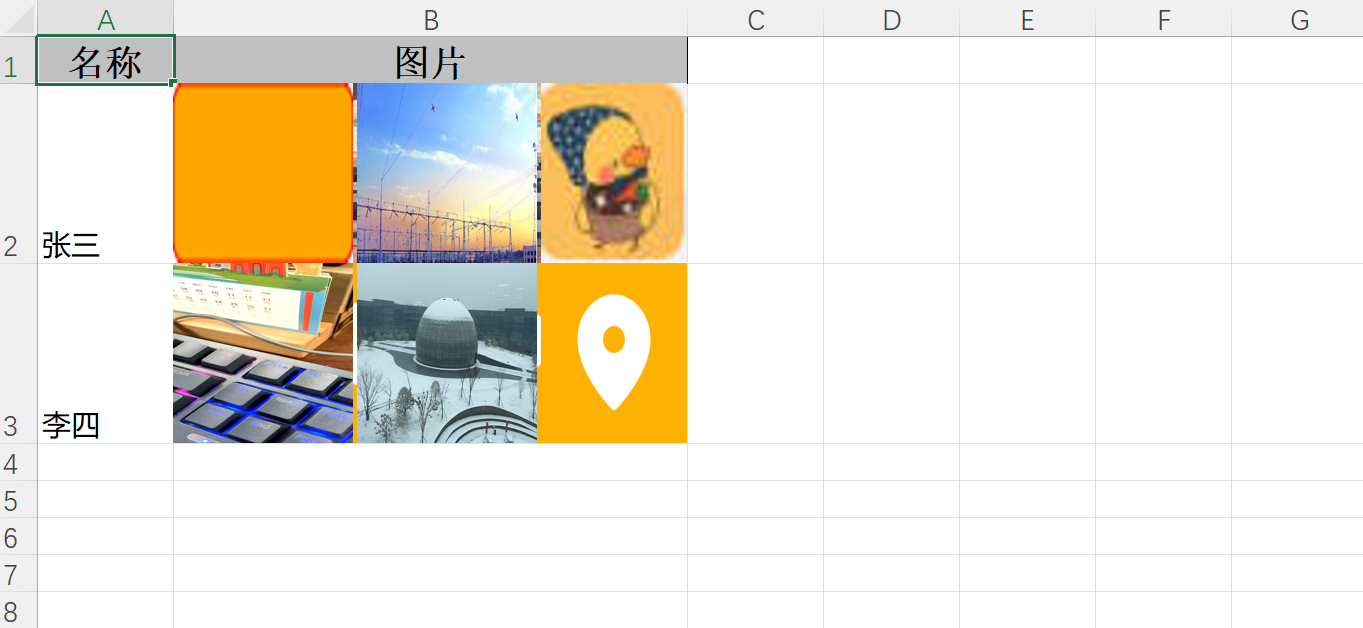
缺点:图片多,导出时间长,文件大小比较大。如何只是导出少量图片,这种方法可以满足需求。
2.2 不用注解,使用自定义handler处理图片位置并写入,同时可以加入图片压缩的逻辑,这样比较灵活。
图片压缩依赖:
    <!-- Thumbnailator 图片处理库 -->
    <dependency>
        <groupId>net.coobird</groupId>
        <artifactId>thumbnailator</artifactId>
        <version>0.4.19</version> <!-- 推荐最新稳定版 -->
    </dependency>
</dependencies>
导出实体VO:
import com.alibaba.excel.annotation.ExcelIgnoreUnannotated;
import com.alibaba.excel.annotation.ExcelProperty;
import lombok.AllArgsConstructor;
import lombok.Data;
import lombok.RequiredArgsConstructor;

import java.util.List;

@RequiredArgsConstructor
@AllArgsConstructor
@Data
@ExcelIgnoreUnannotated
public class MyData {

    @ExcelProperty(value = "名称",index = 0)
    private String name;

    @ExcelProperty(value = "图片",index = 1)
    private String picture;

    private List<String> signImages;

    // ✅ 改为 List<byte[]> 存多张图片
    private List<byte[]> imageList;


    public List<byte[]> getImageList() {
        return ImageUrlConverter.convertUrlListToByteArrayAsync(signImages);
    }
}
下载图片,并支持压缩功能:
package com.gotion.business.school.util;

import lombok.extern.slf4j.Slf4j;
import net.coobird.thumbnailator.Thumbnails;

import javax.imageio.ImageIO;
import java.awt.image.BufferedImage;
import java.io.*;
import java.net.HttpURLConnection;
import java.net.URL;
import java.util.ArrayList;
import java.util.Collections;
import java.util.List;
import java.util.concurrent.ExecutorService;
import java.util.concurrent.Executors;
import java.util.concurrent.Future;
import java.util.concurrent.TimeUnit;

/**
 * 将图片 URL 列表转换为 byte[] 列表
 * 支持 HTTP/HTTPS,带超时和异常处理
 */
@Slf4j
public class ImageUrlConverter {

    private static final int TIMEOUT_MS = 10000; // 10秒超时
    private static final String[] VALID_IMAGE_HEADERS = {"image/", "application/octet-stream"};

    private static final int COMPRESS_MAX_WIDTH = 1920; // 增加宽度 1024
    private static final int COMPRESS_MAX_HEIGHT = 1080;  // 增加高度 768
    private static final long TARGET_SIZE_BYTES = 204_800; // ≈200 KB
    private static final float MIN_QUALITY = 0.5f;       // 设置最低质量限制
    private static final float QUALITY_STEP = 0.05f;     // 每次减少0.05
    // 500kb
    private static final long MAX_IMAGE_SIZE = 307_200;

    // 默认线程池
    private static final ExecutorService DEFAULT_EXECUTOR = Executors.newFixedThreadPool(5);

    /**
     * 将图片 URL 列表转换为 byte[] 列表
     *
     * @param signImages 图片 URL 列表
     * @return List<byte[]>,失败的 URL 返回 null,保持索引一致
     */
    public static List<byte[]> convertUrlListToByteArray(List<String> signImages) {
        if (signImages == null || signImages.isEmpty()) {
            return new ArrayList<>();
        }

        List<byte[]> imageList = new ArrayList<>();
        for (String imageUrl : signImages) {
            //byte[] imageBytes = downloadImageAsBytes(imageUrl);
            byte[] imageBytes = downloadAndProcessImage(imageUrl);
            imageList.add(imageBytes); // 失败时 add(null)
        }
        return imageList;
    }
    /**
     * 下载并处理单个图片(判断大小后决定是否压缩)
     *
     * @param imageUrl 图片 URL
     * @return 图片字节数组,失败返回 null
     */
    private static byte[] downloadAndProcessImage(String imageUrl) {
        byte[] imageData = downloadImageAsBytes(imageUrl);
        if (imageData == null) {
            return null;
        }

        // 如果图片小于500KB,直接返回
        if (imageData.length <= MAX_IMAGE_SIZE) {
            System.out.printf("✅ 图片大小 %d KB,无需压缩%n", imageData.length / 1024);
            return imageData;
        } else {
            System.out.printf("⚠️ 图片大小 %d KB,需要压缩%n", imageData.length / 1024);
            return createThumbnail(imageData);
        }
    }

    /**
     * 使用 Thumbnailator 生成压缩缩略图字节数组
     */
    private static byte[] createThumbnail(byte[] originalImageBytes) {
        ByteArrayInputStream bis = null;
        ByteArrayOutputStream baos = null;

        try {
            bis = new ByteArrayInputStream(originalImageBytes);
            BufferedImage originalImage = ImageIO.read(bis);

            if (originalImage == null) {
                System.err.println("❌ 无法读取图片格式,跳过压缩");
                return originalImageBytes; // 不支持的格式(如 ICO、WebP 等)
            }

            // 获取原始尺寸
            int width = originalImage.getWidth();
            int height = originalImage.getHeight();

            // ✅ 保持宽高比,缩放到最大尺寸内
            double ratio = Math.min(
                    (double) COMPRESS_MAX_WIDTH / width,
                    (double) COMPRESS_MAX_HEIGHT / height
            );
            int scaledWidth = (int) (width * ratio);
            int scaledHeight = (int) (height * ratio);

            // 确保至少 50x50
            scaledWidth = Math.max(scaledWidth, 60);
            scaledHeight = Math.max(scaledHeight, 60);

            System.out.printf("原图 %dx%d → 缩放至 %dx%d%n", width, height, scaledWidth, scaledHeight);

            float quality = 0.9f; // 初始质量 80%
            byte[] result = null;

            while (quality >= MIN_QUALITY) {
                baos = new ByteArrayOutputStream();

                Thumbnails.of(originalImage)
                        .size(scaledWidth, scaledHeight)
                        .outputFormat("jpg")
                        .outputQuality(quality)
                        .toOutputStream(baos);

                result = baos.toByteArray();

                long sizeInKB = result.length / 1024;
                System.out.printf("尝试质量 %.2f → 输出大小: %d KB%n", quality, sizeInKB);

                // 如果压缩后 ≤ 300KB,接受结果
                if (result.length <= TARGET_SIZE_BYTES) {
                    System.out.printf("✅ 压缩成功: %d KB, 质量=%.2f%n", sizeInKB, quality);
                    return result;
                }

                quality -= QUALITY_STEP; // 减少质量
            }

            // 即使最低质量仍大于 300KB,返回最接近的结果
            long finalSizeKB = result.length / 1024;
            if (finalSizeKB > 500) {
                System.out.printf("⚠️ 无法压缩到 300KB 以内,最终大小: %d KB%n", finalSizeKB);
            } else {
                System.out.printf("🟡 接近目标: %d KB%n", finalSizeKB);
            }
            return result;

        } catch (IOException e) {
            System.err.println("❌ 图片压缩失败: " + e.getMessage());
            log.error("图片压缩失败", e);
            return originalImageBytes; // 失败则返回原图
        } finally {
            try {
                if (bis != null) bis.close();
            } catch (IOException ignored) {}
            try {
                if (baos != null) baos.close();
            } catch (IOException ignored) {}
        }
    }
    /**
     * 下载单个图片为 byte[]
     *
     * @param imageUrl 图片 URL
     * @return 图片字节数组,失败返回 null
     */
    private static byte[] downloadImageAsBytes(String imageUrl) {
        if (imageUrl == null || imageUrl.trim().isEmpty()) {
            System.err.println("❌ 空的图片 URL");
            return null;
        }

        imageUrl = imageUrl.trim();

        // 补全协议(如果缺失)
        if (!imageUrl.startsWith("http://") && !imageUrl.startsWith("https://")) {
            imageUrl = "https://" + imageUrl;
        }

        InputStream inputStream = null;
        ByteArrayOutputStream buffer = null;
        HttpURLConnection connection = null;

        try {
            URL url = new URL(imageUrl);
            connection = (HttpURLConnection) url.openConnection();
            connection.setRequestMethod("GET");
            connection.setConnectTimeout(TIMEOUT_MS);
            connection.setReadTimeout(TIMEOUT_MS);
            connection.setInstanceFollowRedirects(true); // 支持重定向

            // 设置 User-Agent(防止被屏蔽)
            connection.setRequestProperty("User-Agent", "Mozilla/5.0 (Windows NT 10.0; Win64; x64) AppleWebKit/537.36");

            int responseCode = connection.getResponseCode();
            if (responseCode != 200) {
                System.err.println("❌ HTTP " + responseCode + " - 无法下载图片: " + imageUrl);
                return null;
            }

            // 验证 Content-Type 是否为图片
            String contentType = connection.getContentType();
            if (!isImageContentType(contentType)) {
                System.err.println("⚠️  非图片类型 (" + contentType + "): " + imageUrl);
                // 有些服务器不返回正确类型,所以不直接返回 null
            }

            inputStream = connection.getInputStream();
            buffer = new ByteArrayOutputStream();

            byte[] tempBuffer = new byte[1024];
            int bytesRead;
            while ((bytesRead = inputStream.read(tempBuffer)) != -1) {
                buffer.write(tempBuffer, 0, bytesRead);
            }

            byte[] imageData = buffer.toByteArray();
            if (imageData.length == 0) {
                System.err.println("❌ 下载的图片为空: " + imageUrl);
                return null;
            }

            System.out.println("✅ 成功下载图片: " + imageUrl + " (" + imageData.length / 1024 + " KB)");
            return imageData;

        } catch (IOException e) {
            System.err.println("❌ 下载图片失败: " + imageUrl + " | " + e.getMessage());
            return null;
        } finally {
            closeQuietly(inputStream);
            closeQuietly(buffer);
            if (connection != null) {
                connection.disconnect();
            }
        }
    }

    /**
     * 判断 Content-Type 是否为图片类型
     */
    private static boolean isImageContentType(String contentType) {
        if (contentType == null) return false;
        for (String header : VALID_IMAGE_HEADERS) {
            if (contentType.toLowerCase().startsWith(header)) {
                return true;
            }
        }
        return false;
    }
/**
     * 安全关闭 Closeable 资源
     */
    private static void closeQuietly(Closeable closeable) {
        if (closeable != null) {
            try {
                closeable.close();
            } catch (IOException e) {
                // 忽略
            }
        }
    }

    public static List<byte[]> convertUrlListToByteArrayAsync(List<String> signImages) {
        if (signImages == null || signImages.isEmpty()) return new ArrayList<>();

        int size = signImages.size();
        List<byte[]> results = new ArrayList<>(Collections.nCopies(size, null));
        ExecutorService executor = Executors.newFixedThreadPool(
                Math.min(size, 10));
        try  {

            List<Future<?>> futures = new ArrayList<>();
            for (int i = 0; i < size; i++) {
                final int index = i;
                Future<?> future = executor.submit(() -> {
                    byte[] data = downloadAndProcessImage(signImages.get(index));
                    results.set(index, data);
                });
                futures.add(future);
            }

            // 等待完成
            for (Future<?> f : futures) {
                try {
                    f.get(10, TimeUnit.SECONDS); // ✅ 加超时,避免卡死
                } catch (Exception e) {
                    int idx = futures.indexOf(f);
                    results.set(idx, null); // 标记失败
                }
            }
        }finally {
            executor.shutdown();
        }

        return results;
    }
}
自定义handler:
import com.alibaba.excel.metadata.Head;
import com.alibaba.excel.metadata.data.WriteCellData;
import com.alibaba.excel.write.handler.CellWriteHandler;
import com.alibaba.excel.write.metadata.holder.WriteSheetHolder;
import com.alibaba.excel.write.metadata.holder.WriteTableHolder;
import lombok.extern.slf4j.Slf4j;
import org.apache.poi.ss.usermodel.*;
import org.apache.poi.util.Units;

import java.util.*;
@Slf4j
public class ThumbnailWriteHandler implements CellWriteHandler {

    private final Map<String, List<byte[]>> imageDataMap = new HashMap<>();
    private int imageColumnIndex = 1; // 图片所在列索引

    private static final int DEFAULT_IMAGE_WIDTH_PX = 60;
    private static final int DEFAULT_IMAGE_HEIGHT_PX = 60;
    private static final int IMAGE_SPACING_PX = 2;
    private static final double POINTS_PER_PIXEL = 72.0 / 96.0;
    private static final double PIXELS_PER_CHAR = 8.0;
    private int maxImageCount = 0; // 记录所有行中最多的图片数量
    private boolean columnWidthSet = false; // 标记列宽是否已设置

    private final int imageWidthPx;
    private final int imageHeightPx;

    public ThumbnailWriteHandler() {
        this(DEFAULT_IMAGE_WIDTH_PX, DEFAULT_IMAGE_HEIGHT_PX);
    }
    public ThumbnailWriteHandler(int imageWidthPx, int imageHeightPx) {
        this.imageWidthPx = imageWidthPx;
        this.imageHeightPx = imageHeightPx;
    }
    public ThumbnailWriteHandler(int imageWidthPx, int imageHeightPx, int imageColumnIndex) {
        this.imageWidthPx = imageWidthPx;
        this.imageHeightPx = imageHeightPx;
        this.imageColumnIndex = imageColumnIndex;
    }


    // 外部传入数据:rowIndex -> 图片列表
    public void setImageData(Map<Integer, List<byte[]>> data) {
        this.imageDataMap.clear();
        maxImageCount = 0; // 重置

        for (Map.Entry<Integer, List<byte[]>> entry : data.entrySet()) {
            List<byte[]> images = entry.getValue();
            if (images != null && !images.isEmpty()) {
                maxImageCount = Math.max(maxImageCount, images.size());
            }
            this.imageDataMap.put("row_" + entry.getKey(), images);
        }
    }

    @Override
    public void afterCellDispose(WriteSheetHolder writeSheetHolder, WriteTableHolder writeTableHolder,
                                 List<WriteCellData<?>> cellDataList, Cell cell,
                                 Head head, Integer relativeRowIndex, Boolean isHead) {
        if (isHead || cell == null) return;

        Sheet sheet = cell.getSheet();
        Workbook workbook = sheet.getWorkbook();


        int colIndex = cell.getColumnIndex();
        int rowIndex = cell.getRowIndex();

        // 假设第 2 列(index=1)是你要插入缩略图的位置
        if (colIndex == imageColumnIndex) {
            List<byte[]> images = imageDataMap.get("row_" + rowIndex);
            if (images != null && !images.isEmpty()) {
                setOptimalRowHeight(sheet, rowIndex);
                // ✅ 只设置一次列宽
                if (!columnWidthSet) {
                    setOptimalColumnWidth(sheet, colIndex);
                    columnWidthSet = true;
                }
                insertThumbnails(workbook, sheet, cell, images);
            }
        }
    }

    private void setOptimalRowHeight(Sheet sheet, int rowIndex) {
        Row row = sheet.getRow(rowIndex);
        if (row == null) row = sheet.createRow(rowIndex);
        double heightInPoints = imageHeightPx * POINTS_PER_PIXEL;
        row.setHeightInPoints((float) heightInPoints);
    }

    private void setOptimalColumnWidth(Sheet sheet, int columnIndex) {
        //double totalWidthPx = imageWidthPx * imageCount + IMAGE_SPACING_PX * (imageCount - 1);
        double totalWidthPx = imageWidthPx * maxImageCount + IMAGE_SPACING_PX * (maxImageCount - 1);
        double widthInChars = totalWidthPx / PIXELS_PER_CHAR;
        int columnWidth = (int) (widthInChars * 256);
        columnWidth = Math.max(columnWidth, 6_000); // 至少 6000
        sheet.setColumnWidth(columnIndex, columnWidth);
    }


    private void insertThumbnails(Workbook workbook, Sheet sheet, Cell cell,
                                  List<byte[]> imageBytesList) {

        Drawing<?> drawing = sheet.getDrawingPatriarch();
        if (drawing == null) {
            drawing = sheet.createDrawingPatriarch();
        }

        int colIndex = cell.getColumnIndex();
        int rowIndex = cell.getRowIndex();

        int thumbWidth = imageWidthPx;   // 使用构造函数传入的宽度
        int margin = IMAGE_SPACING_PX;   // 使用类常量

        int xOffset = margin; // 所有图片从左侧 margin 开始

        //Set<String> added = new HashSet<>();

        for (byte[] imageBytes : imageBytesList) {
            if (imageBytes == null || imageBytes.length == 0) continue;

            // ✅ 可选:关闭去重(如果你确认图片不同但仍被跳过)
            // String hash = DigestUtils.md5Hex(imageBytes);
            // if (added.contains(hash)) continue;

            try {
//                byte[] imageToInsert;
//
//                // ✅ 判断:只有大于 1MB 才压缩
//                if (imageBytes.length > MAX_IMAGE_SIZE) { // 1MB = 1,000,000 字节
//                    //System.out.println("压缩图片: " + imageBytes.length + " bytes -> " + imageWidthPx + "x" + imageHeightPx);
//                   // imageToInsert = createThumbnail2(imageBytes, imageWidthPx, imageHeightPx);
//                    imageToInsert = createThumbnailByThumbnailator(imageBytes);
//                } else {
//                    System.out.println("小图不压缩,直接插入: " + imageBytes.length + " bytes");
//                    imageToInsert = imageBytes; // 直接使用原图
//                }
//
//                int pictureType = determinePictureType(imageToInsert);
//                int pictureIdx = workbook.addPicture(imageToInsert, pictureType);
                int pictureType = determinePictureType(imageBytes);
                int pictureIdx = workbook.addPicture(imageBytes, pictureType);

                ClientAnchor anchor = drawing.createAnchor(0, 0, 0, 0, colIndex, rowIndex, colIndex, rowIndex);
                anchor.setDx1(Units.pixelToEMU(xOffset));
                anchor.setDy1(Units.pixelToEMU(margin));
                anchor.setDx2(Units.pixelToEMU(xOffset + thumbWidth));
                anchor.setDy2(Units.pixelToEMU(margin + imageHeightPx));
                anchor.setAnchorType(ClientAnchor.AnchorType.MOVE_AND_RESIZE);

                drawing.createPicture(anchor, pictureIdx);
                // added.add(hash); // ✅ 如果关闭去重,注释这行

                // 只更新 x 偏移,y 不变(同一行)
                xOffset += thumbWidth + margin;

            } catch (Exception e) {
                System.err.println("插入缩略图失败: " + e.getMessage());
            }
        }
    }


    private int determinePictureType(byte[] data) {
        if (data == null || data.length < 3) {
            return Workbook.PICTURE_TYPE_DIB;
        }

        // JPEG
        if ((data[0] & 0xFF) == 0xFF && (data[1] & 0xFF) == 0xD8) {
            return Workbook.PICTURE_TYPE_JPEG;
        }
        // WMF
        if (data[0] == 'W' && data[1] == 'M' && data[2] == 'F') {
            return Workbook.PICTURE_TYPE_WMF;
        }
        // PNG
        if (data.length >= 8 &&
                data[0] == (byte) 0x89 && data[1] == 'P' && data[2] == 'N' && data[3] == 'G' &&
                data[4] == 0x0D && data[5] == 0x0A && data[6] == 0x1A && data[7] == 0x0A) {
            return Workbook.PICTURE_TYPE_PNG;
        }
        // EMF (更准确的检测)
        if (data.length >= 4) {
            // EMF文件以EMF元文件头开始
            if (data[0] == 0x01 && data[1] == 0x00 && data[2] == 0x00 && data[3] == 0x00) {
                return Workbook.PICTURE_TYPE_EMF;
            }
            // 或者检查" EMF"签名(在某些EMF文件中存在)
            if (data.length >= 8 &&
                    data[0] == 0x20 && data[1] == 0x45 && data[2] == 0x4D && data[3] == 0x46) {
                return Workbook.PICTURE_TYPE_EMF;
            }
        }
        // BMP/DIB
        if (data[0] == 'B' && data[1] == 'M') {
            return Workbook.PICTURE_TYPE_DIB;
        }

        // 默认返回DIB
        return Workbook.PICTURE_TYPE_DIB;
    }

}
数据测试:
import cn.hutool.core.date.StopWatch;
import com.alibaba.excel.EasyExcel;

import java.util.ArrayList;
import java.util.HashMap;
import java.util.List;
import java.util.Map;

public class TestMyData {
    public static void main(String[] args) {
        StopWatch stopWatch = new StopWatch("多缩略图测试");
        stopWatch.start();
        MyData myData = new MyData();
        myData.setName("张三");
        myData.setSignImages(List.of("https://mom.gotion.com.cn:9199/oatest-minio/school-oa/bbs/2025/08/13/banner_20250813202603A007.png", "https://mom.gotion.com.cn:9199/oatest-minio/school-oa/bbs/2025/08/08/1_20250808143309A006.JPEG",
                "https://mom.gotion.com.cn:9199/oatest-minio/school-oa/bbs/2025/08/13/touxiang_20250813203853A009.jpg","https://mom.gotion.com.cn:9199/oatest-minio/school-oa/bbs/2025/08/14/7e2c5ca66699934eb4991db8fb9e5c32_origin(1)_20250814170814A004.jpg"));


        MyData myData2 = new MyData();
        myData2.setName("李四");
        myData2.setSignImages(List.of("https://mom.gotion.com.cn:9199/oatest-minio/school-oa/bbs/2025/08/14/tmp_3783a8a1124b11c5d87fc525636a1249458fb04850517a40_20250814141318A005.jpg", "https://mom.gotion.com.cn:9199/oatest-minio/school-oa/bbs/2025/08/13/a3f5dd3c-dd99-468c-bc37-a785961a6bac_20250813191852A006.jpg",
                "https://mom.gotion.com.cn:9199/oatest-minio/school-oa/bbs/2025/08/13/4c164be45de6c822ba9ccc5d0bcacbc8_20250813202916A004.png"));

        List<MyData> data = new ArrayList<>();
        data.add(myData);
        data.add(myData2);
        String fileName = "多缩略图测试.xlsx";

        // 构建图片数据映射
        ThumbnailWriteHandler handler = new ThumbnailWriteHandler();
        Map<Integer, List<byte[]>> imageMap = new HashMap<>();
        for (int i = 0; i < data.size(); i++) {
            imageMap.put(i+1, data.get(i).getImageList()); // 提前准备好图片
        }
        handler.setImageData(imageMap);

        EasyExcel.write(fileName, MyData.class)
                .registerWriteHandler(handler)
                .sheet("学生信息")
                .doWrite(data);
        stopWatch.stop();
        System.out.println("耗时:"+stopWatch.getTotalTimeMillis());

    }

}
效果如下:
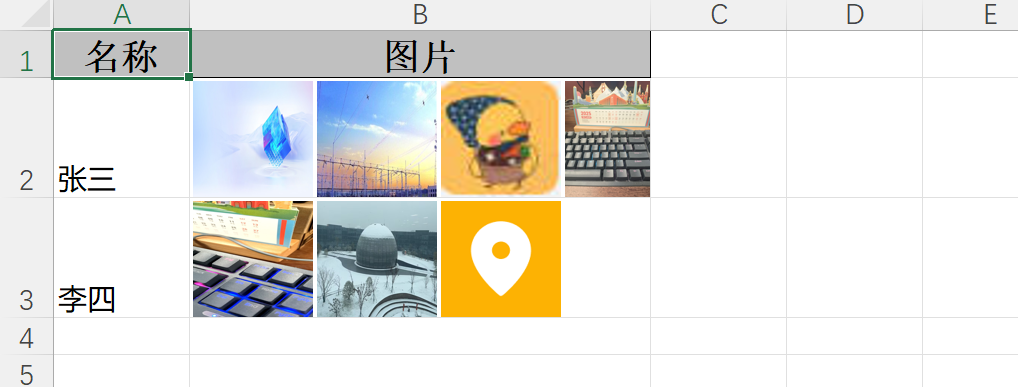
缺点:导出的图片经过压缩,不是原图,如果必须要原图,那么可以去掉图片压缩逻辑。
3、小结
easyExcel支持导出图片,可以直接使用,详细参考官方文档;如果导出图片有位置要求,或者需要压缩处理等其他需求,那么最好自定义handler,实现相关功能。